
Download Vocal Remover by Remusic – Free AI Vocal Isolation Tool
Overview
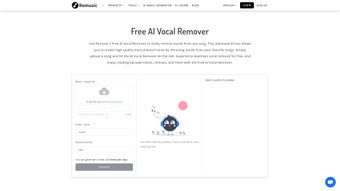
Vocal Remover by Remusic is a cutting‑edge, AI‑driven web application that lets you strip vocals from any audio track in a matter of seconds. Built for DJs, remix artists, music teachers, and casual karaoke enthusiasts, the tool works directly in your browser—no software download, no hidden fees, and no subscription required. Simply upload an MP3, WAV, or FLAC file, or paste a YouTube or SoundCloud URL, and the intelligent algorithm isolates the vocal frequencies, delivering a clean instrumental version that retains the original mix’s depth and dynamics.
Because the service is cloud‑based, it benefits from continuous model updates, ensuring better separation over time without any effort on your part. Whether you’re preparing a backing track for a live performance, creating a remix for a club set, or just experimenting with music production, Vocal Remover offers a seamless, secure, and fast solution. The interface is designed for ease of use: a single drag‑and‑drop area, a progress bar, and an instant preview of the result.
After processing, you can download the instrumental file in the same format you uploaded, ready for immediate use. While the AI may occasionally leave faint remnants of the lead vocal on complex, densely layered songs, the overall quality is impressive for a free, browser‑only tool, making it a valuable addition to any musician’s toolkit.
Key Features
- AI‑Powered Vocal Isolation: Advanced deep‑learning models separate vocals from instruments with high precision.
- Multi‑Format Support: Accepts MP3, WAV, FLAC, OGG and direct URLs from YouTube, SoundCloud, and other streaming services.
- Instant Preview: Listen to the instrumental version before downloading, ensuring you get the desired result.
- One‑Click Download: Export the processed track in the original file format with a single click.
- No Registration Required: Use the tool anonymously; there are no hidden fees or subscription plans.
- Cross‑Platform Accessibility: Works on any modern browser across Windows, macOS, Linux, Android, and iOS.
- Secure Processing: Files are encrypted during upload and automatically deleted from servers after processing.
- Continuous Model Updates: The AI engine is regularly refined, improving separation quality over time.
- Batch Processing (Pro Version): For power users, a premium option allows multiple tracks to be processed simultaneously.
Installation & Compatibility
One of the biggest advantages of Vocal Remover by Remusic is that it eliminates the traditional “install‑and‑configure” hassle. The entire application runs in the cloud, meaning you only need a stable internet connection and a compatible web browser. Supported browsers include Google Chrome, Mozilla Firefox, Microsoft Edge, Safari, and Opera. Because the service is browser‑based, it automatically adapts to the operating system you’re using, whether it’s Windows 10/11, macOS Ventura, Linux distributions, Android 13, or iOS 17. This universal compatibility ensures that you can access the tool from a desktop workstation, a laptop on the go, or even a tablet in a rehearsal studio.
To get started, navigate to the Remusic website, locate the Vocal Remover section, and either drag your audio file onto the upload zone or paste a link. The AI begins processing immediately, typically completing a three‑minute song in under a minute. While no installation is required, users should keep their browsers up to date to benefit from the latest security patches and performance enhancements.
For those concerned about data privacy, the platform follows GDPR‑compliant policies: uploaded files are encrypted in transit (TLS 1.3) and are purged from the server within 24 hours of completion. If you prefer a more controlled environment, the premium desktop version (currently in beta) can be installed on Windows or macOS, offering offline processing while still leveraging the same AI core. However, for the vast majority of casual users, the web app provides a perfectly smooth, zero‑maintenance experience.
Compatible Operating Systems: Windows 10/11, macOS Ventura and later, Linux (Ubuntu, Fedora, Debian), Android 9 and above, iOS 13 and above.
Pros & Cons
Pros
- Fully free for basic vocal removal—no subscription lock‑in.
- AI technology delivers clean instrumental tracks in seconds.
- Browser‑only access eliminates the need for installation or updates.
- Supports a wide range of audio formats and streaming URLs.
- Secure file handling with automatic deletion after processing.
- Works across all major operating systems and devices.
- Instant preview lets you verify results before download.
- Regular AI model improvements keep the tool up‑to‑date.
Cons
- Separation quality can vary with heavily layered or low‑bitrate tracks.
- Large files (>100 MB) may take longer to upload and process.
- Free tier limits the number of daily conversions per IP address.
- Advanced batch processing is only available in the paid Pro version.
- No native mobile app yet; reliance on mobile browsers may affect performance.
FAQ & Conclusion
Is Vocal Remover completely free to use?
Yes, the core vocal removal service is free with no hidden fees. A paid Pro tier exists for batch processing and higher daily limits, but the basic functionality remains unrestricted.
What audio formats can I upload?
The tool accepts MP3, WAV, FLAC, OGG, and AAC files. It also supports direct URLs from YouTube, SoundCloud, and other popular streaming services.
How secure is my uploaded music?
All uploads are encrypted via TLS 1.3 during transit and stored temporarily on secure servers. Files are automatically deleted 24 hours after processing, complying with GDPR standards.
Can I use Vocal Remover on mobile devices?
Absolutely. Since it runs in a web browser, you can access it from Android or iOS devices. Performance depends on the device’s processing power and internet speed.
Why does the instrumental sometimes still contain faint vocals?
Vocal isolation is a complex task, especially with songs that have heavily mixed vocals or overlapping frequency ranges. While the AI does a remarkable job on most tracks, some dense productions may retain subtle vocal traces.
In summary, Vocal Remover by Remusic stands out as a powerful, user‑friendly AI tool that makes vocal extraction accessible to anyone with an internet connection. Its zero‑install approach, broad format support, and commitment to privacy give it a distinct edge over traditional desktop plugins. Whether you’re a karaoke host needing quick backing tracks, a producer looking for clean instrumentals, or an educator creating lesson material, this web app delivers results that rival many paid alternatives.
For the best experience, use high‑quality source files and a modern browser, and consider the Pro version if you require batch processing or higher daily limits. Ready to transform your music library? Download Vocal Remover by Remusic now and start creating professional‑grade instrumentals in seconds.



.png)



